Pratham Filters, a filtration company chose Sage EES, which integrates Sage ACCPAC ERP and Sage CRM new system which was implemented by Greytrix, Sage's implementation partner. Aside from the Sage EES solution suite, Greytrix also deployed Greytrix TDS, which caters to the taxation needs based on set Indian standards and policies.Read more about the successful implementation of Sage EES across Pratham Filters
Showing posts with label TDS. Show all posts
Showing posts with label TDS. Show all posts
Friday, July 13, 2012

Wednesday, May 30, 2012
Statutory Form v6.0 for Sage Accpac v6.0 ERP

This post will be useful for our clients on Sage (Accpac)300 ERP with operations in India.
To avail concessional Tax Rates
Customers/Vendors issue different types of statutory
forms against their Sales/Purchases to/from a registered customer/Vendor
for e.g. “C”, “H”, etc are some types of Forms.
Form C is issued by the dealer for purchasing
goods from the dealer outside the state in which he resides the effect can be
understood by looking at following example IF Mr. A Registered Dealer in
Hyderabad (AP) wants to purchase goods from Mr. B a registered dealer in
Mumbai. Mr. B who is selling the goods will charge VAT @ 4% or 12.5% on the
goods if Mr. A issues him “C” Form then Mr. B should Charge him CST @ 2% so Mr.
A is Saving Tax.

Just to summarize Statutory Form Module, we have provided an optional field named “FORMTYP” with 4 values listed “C”, “F”, “H” and “NA” against the AP/AR Invoices. The user can select this optional field as needed and post the invoice, and when the same data is retrieved on form tracker screen the Form Type value is fetched against the document from the optional field.
Sage Accpac ERP comprising with Greytrix Statutory Form Maintenance allows the dealer to keep a track of the various form applicable like Form C, H, etc. The add-on will allow users to maintain/track the receipt/issue of such statutory forms in an efficient way. We have also bundled this with few basic reports to supplement.
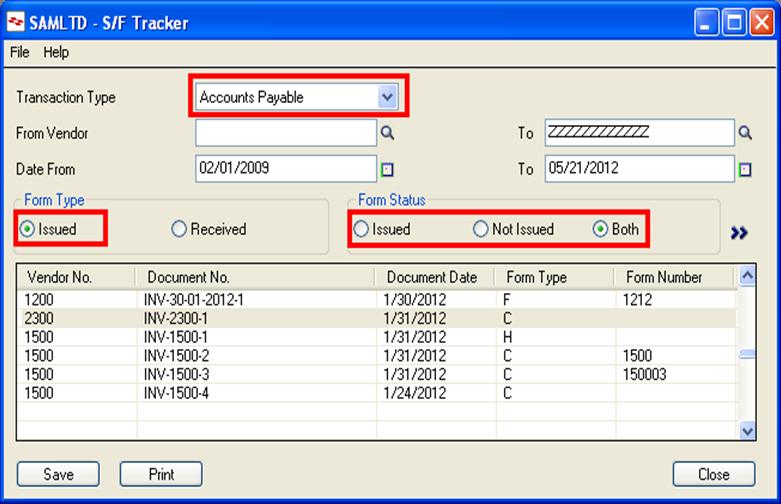
1. Maintain Information:
- Form applicable or not for the Customer/Vendor.
- Name of the Form received.
- Form Number for each Invoice.
2. Transact with Statutory Form for Customers and Vendors:
- Receive the Statutory forms, from the Customers or Vendors for the particular Invoices in the date range given by the user.
3. Print Statutory Form
- The reporting provides flexible filtrations options of customer/Supplier No, form and to invoice dates before printing the information.

Saturday, May 19, 2012
How to resolve an error:- “An error (-5006: 0x80070002) has occurred while running the setup”
Most of the
times, while installing/uninstalling any application, user gets an error as “An error (-5006: 0x80070002) has occurred
while running the setup”. Please refer the below screen shot for the error.

This error generally occurs when terminal
server may not be in the install
mode. To change/switch the server in install mode, please follow the below
process.
To Switch Terminal
Services to Install Mode
When you want to add or
remove programs, put the Terminal Services server in Install mode. To do this:
- Click Start,
and then click Run.
- In the Open box, type cmd,
and then click OK.
- At the command prompt, type change
user /install, and then press ENTER. The following message
appears:
“User session is ready to install applications.” - Type exit, and then press ENTER.
Now you can add/ remove any application from Control panel.
Greytrix TDS v2.2 for SAGE 300 ERP

Sage 300 (formerly Sage Accpac ) ERP has flexibility to support the unique needs of multi-site and global organizations. For global organizations with offices in India we have developed a must- needed Tax Solution "Greytrix TDS (Tax Deducted at Source ) for Sage 300 ERP"
Get ready for a First look of our Greytrix 300 (Accpac) ERP with enhanced features. in this version Greytrix TDS ( Tax Deducted at Source) modules will be available in portal with all these features.
Tax deducted at Source is an add-on for Sage Accpac ERP enabling organizations to maintain complex requirements on Tax Deducted at Source and generates reports and forms required by the Central Government including eTDS file. Tax deducted at Source automates your tax deduction calculations under various sections and slabs and provides you comprehensive, accurate and detailed reporting.
Overview of enhancement of Greytrix TDS portal:
Below Image show the user interface links of Greytrix TDS provided in the Sage 300 Portal.

You can easily Generate TDS related Reports
like:
1.
Form 16A
2.
Form 26Q/27Q
3.
Deduction and remittance
4. TDS
challan
5. E-TDS
quarterly return
Lets now see the shortcut
navigation tab of Greytrix TDS for Easy access of User Interface in Sage 300
ERP Portal

Now lets look at User Interface of “Nature of deduction” from portal. User can easily access the entire screen same like earlier version of TDS but with new advanced look.

Do provide us with you feedback/suggestion on sage@greytrix.com . We would be glad to make additions to our existing list.
Saturday, May 5, 2012
Reverse Remittance Entry Option in the Greytrix TDS Utility
TDS plays an important role
within different sections of Indian Market, and almost every Individual/Company
is liable to pay TDS to the government.
The TDS Deduction and Remittance
process are easily followed by the Greytrix TDS users but the problem occurs if
we need to reverse the TDS once the document is already remitted.
There are several occurrences when we deduct the TDS against a vendor and
even selected the document for the Remittance purpose. Now as seen in the below
screen shot the document has appeared within the remittance Entry.
Now for any reason if the user wants to remove the Transaction from the
Remittance i.e. make the document available for Remittance again.
We have made this option easy in the Greytrix TDS utility, where in we
have provided the “Void Remittance” button in our Greytrix TDS utility which
will help you to reverse the remittance entry. This feature will make all the
documents within the Remittance available for the Remittance again.
Below screen shows
the Void Remittance button: -

Thursday, April 26, 2012
TDS Cumulative cutoff Deduction
TDS has
significant importance in Indian taxation system and every Individual/Company
need to pay TDS to government. We are providing a brief explanation on handling
of Cumulative Cutoff while operating the Greytrix
TDS utility.
Cumulative cutoff:
If you check the cumulative cutoff check box
then program will consider this section as under cumulative cutoff. You can
define cumulative cutoff amount in NOD screen for those TDS section which are
belonging from this categories. Refer the below screen shot.

Whenever we define a Nature of deduction with a cumulative cut off section we need to set a particular amount as cumulative cut off limit [refer the below screen shot]. As per the cumulative cut off section rule it says that all the documents which lie below the cumulative cut off amount do not qualify for TDS deduction.

But when any
Invoice against the same vendor is created such that the sum of all the
previous documents and the current one exceeds the cumulative cut off limit in
that case deduction is done on the
entire summed up amount.
For example consider VENDOR V0001 is under the NOD which has cumulative cut off section applied against it. Consider, cumulative cutoff amount is RS 30000, in this case if you create 1st invoice of RS 25000. TDS amount will not be deducted for this invoice. But, if you create a document of RS 6000 then sum of all the documents results in to 31000 and this has exceeded the cut off limit along with the previous document. So, TDS amount would be RS 3100 if TDS percentage is 10.
For example consider VENDOR V0001 is under the NOD which has cumulative cut off section applied against it. Consider, cumulative cutoff amount is RS 30000, in this case if you create 1st invoice of RS 25000. TDS amount will not be deducted for this invoice. But, if you create a document of RS 6000 then sum of all the documents results in to 31000 and this has exceeded the cut off limit along with the previous document. So, TDS amount would be RS 3100 if TDS percentage is 10.
Note: Suppose
you define the cumulative cutoff as RS 30,000 and also you have provided the
TDS percentage amount [e.g. 10] for range 0-30,000. In this case program will
not consider this NOD as under cumulative cutoff. TDS will be deducted for all documents
which are belonging from this NOD.
Read more
Monday, May 23, 2011
Greytrix Launches Greytrix TDS 2.1v for Sage ACCPAC ERP
Greytrix launches the new improved version of Greytrix TDS 2.1 for Sage ACCPAC ERP. Along with the basic functionalities, Greytrix has encorporated further enhancement are as follows:-
•Provided the User a screen called Manual TDS Entry where user can hit the TDS Register even if the Invoice is posted.Manual TDS entry allows changing TDS related fields before crating Remittance of the TDS applicable document. The changes one makes using Manual TDS entry hits TDS registers.
One can change the TDS related data for the following documents:
1.Invoice
2.Credit Note
3.Debit Note
4.Prepayment
•Modified the Form16 A Register to take the Vendor Range and even more parameters [Assessment Year/Issue Date/].
•Modified the Form 16A to include latest format and annexure displaying the entire list of transactions.
•Added a feature of overriding the TDS Base Amount in Prepayment/Misc Payment.
•The Partial PJC Integration; i.e. the adjustment part is not done but the job
related entries are passed in the TDS Register.
•Allowing deduction for Plain Credit notes/Debit Notes applied against Credit Notes/Invoices.
To grab your trial copy email us at sales@greytrix.com
•Provided the User a screen called Manual TDS Entry where user can hit the TDS Register even if the Invoice is posted.Manual TDS entry allows changing TDS related fields before crating Remittance of the TDS applicable document. The changes one makes using Manual TDS entry hits TDS registers.
One can change the TDS related data for the following documents:
1.Invoice
2.Credit Note
3.Debit Note
4.Prepayment
•Modified the Form16 A Register to take the Vendor Range and even more parameters [Assessment Year/Issue Date/].
•Modified the Form 16A to include latest format and annexure displaying the entire list of transactions.
•Added a feature of overriding the TDS Base Amount in Prepayment/Misc Payment.
•The Partial PJC Integration; i.e. the adjustment part is not done but the job
related entries are passed in the TDS Register.
•Allowing deduction for Plain Credit notes/Debit Notes applied against Credit Notes/Invoices.
To grab your trial copy email us at sales@greytrix.com
Friday, March 26, 2010
GIVE YOUR ACCOUNTANTS BREAK FROM THE TEDIOUS TDS

Complications are just around the corner when we talk about the TDS provisions i.e. Tax Deducted At Source. TDS is a statutory obligation implied by the Income Tax Laws on every Individual/ Firm/ Organization. TDS is the amount which is deducted by anybody (Individual/Firm/Organization) who is having a valid TAN No. and have a valid contract with the assesse as per the rates defined by the finance ministry and the amount is being credited in govt. a/c by the tax deductor and issue a TDS certificate to the assesse.
TDS is liable to be deducted only when the amount of payment exceeds minimum limit for TDS category in one accounting year. Further in order to reduce hardship on smaller contractors a provision is made under Income Tax rules to levy reduced TDS rate for certain period on due authorized letter.
Confused???
As said earlier, there is nothing as complicated as the TDS rules and regulations. Imagine the terror the accountants of each association go through every quarter end.
Frequently asked questions like, how do I calculate the miscellaneous payment? How will the e-TDS returns be prepared?
What are the due dates for filing quarterly TDS Returns?
And many of such ordeals occur at the time of TDS filing and many a time due to lack of accurate information organizations end paying heavy penalties for not submitting the accounts in time.
There is a better way, to tackle in the TDS provisions along with the financial accounting of your organization.
Greytrix leads an easy way through the as ever difficult Indian Statutory especially in the TDS provisions by coming with the Greytrix Add-on TDS module for all the editions of Sage ACCPAC ERP. The TDS module, an add-on for Sage ACCPAC ERP, captures essential tax related information and generates reports in government recognized formats.
The Tax vital information like maintaining the default state codes and the section of coverage is done within the TDS Module automatically. Maintaining the various bank codes and the branch codes was always a mess with the system capturing this data and with the help with the advance finder options entering making a remit entry is no longer an hour’s job.
You can process TDS transactions like the tds deduction at source for regular invoice, cumulative cutoff invoice, acknowledgement entries and much more. Generate the Forms like 16A, 26/27Q using user apt parameters to get exactly what the government requires to witness at every accounting period end.
Form 16 A has an exhaustive information to capture like the Acknowledgement Nos. of all Quarterly Statements of TDS under sub-section (3) of section 200 as provided by TIN Facilitation Centre or NSDL web-site along with the details of payment, tax deduction and deposit of tax into Central government account.
Once the tax from the vendor is deducted and remitted, the deducting authority should provide Form16A report to the service provider for his remittance. In this form, you can generate Form16A copies as well as generate print outs for the same.
Also, Form 26 Q and Form 27 Q are the hard copies of the remittance submitted to the Tax Authority of India for their verification. The Form26Q is related to the resident Tax Payable Persons and Form27Q is for non-resident persons. Each form details should be submitted to the government on quarterly basis.
Calculation of the tax to be remitted is just one side of the coin and to remit the amount without any penalty is the other herculean task. Greytrix TDS module calculates the due dates of remitting the amount to the government once the user enters the start date of the fiscal calendar. Thus your finance team is aware of the penalty strike occurrence if due dates cross over allowing them to be well prepared in advance.
With a vital combination of a World Class ERP solution and technical expertise from Greytrix, Greytrix TDS add on for Sage Accpac ERP works more accurately and in the favor of the Indian Tax Scenarios.
We @ Greytrix let the products speak for themselves hence request for a live demo or webinar for your team, where we would addresses the pain points in your organization and guide you to a more efficient business process. Mail us at marketing @greytrix.com for Greytrix TDS for Sage Accpac ERP Demo.
Subscribe to:
Posts (Atom)

 Posts
Posts

