Showing posts with label SME ERP. Show all posts

Friday, October 26, 2012

Shortcut Keys in Accpac


The computer mouse simplifies the way you navigate through a computer screen by pointing and clicking on the screen. However, as using your mouse is not necessarily the most efficient way to select and open items on your screen. Sage Accpac ERP simplifies the data entry task by incorporating this feature.
In Sage ERP (Accpac), there are a handful of useful shortcut keys that you can use to save time to navigate through the screens. To see how the shortcut keys can be used in Sage Accpac ERP, let us use the O/E Order Entry screen as an example.
You can use the following shortcut keys to navigate through the orders:
o  Page UpGo to the first (top) record in a list.
o  Page DownGo to the last (bottom) record in a list.
o  Ctrl/Page Up - Go to the first record in a Finder list.
o  Ctrl/Page DownGo to the last record in a Finder list.


Now let us see how shortcut keys can be used in the Order Detail grid highlighted in red:
o  Ctrl/TabMove out of a grid or list to the button or field following the grid or list.
o  Ctrl/Shift/TabMove out of a grid or list to the button or field directly above the grid or list.
o  HomeGo to the first entry in a list.
o  End Go to the last entry in a list.
o  Up Arrow/Down ArrowGo up or down one line in a grid.
o  Tab or EnterGo to the next column.
o  SHIFT + TAB or SHIFT + ENTERGo the previous column.
o  F9 – If you select any of the line items and press this key, you can drill down on the line item.


o   F5 - If you have the cursor inserted in any field that has a Finder icon (the one with the magnifying glass icon), you can activate the Finder search function by pressing the F5 key.

o   CCalculator – If you select any of the columns related to quantity, amount and press Shift+ key, a calculator appears where the required calculations can be done.


o   Tab Key – The tab key can be used to navigate from one tab to another.

o   Navigation Keys – There are following four navigation keys in Accpac:

First, Previous, Next and Last
First: To go to the first record from the finder list
Previous: To go to the Previous record from the finder list
Next: To go to the Next record from the finder list
Last: To go to the Last record from the finder list


Saturday, June 2, 2012

Do you have problem in opening crystal reports on a terminal server?


In several cases crystal reports work’s well on the server but still it cannot be open on terminal server.
The problems faced by the people within the organization due to absence of crystal reports are: -
  1. Senior Managers await these crystal reports and they are not available on time.
  2. Data entry operators need to start their daily chores after confirming previous work based on these crystal reports which remain pending as they are not able to open the reports.

After checking all the possibilities right from setup to ODBC to registration of DLL( Dynamic Link Library), but often we tend to forget that DLL required to run these reports has been copied on the terminal server or not? Sometimes it happens that these files are present on server but find missing on terminal server and hence we are not able to access these reports made in crystal.
In case you come across similar problem, now follow few basic steps to get it resolved: -
First Step: - Do check the DLL on server at path: C:\Windows\Crystal ……
Second Step: -Copy the multiple DLL files existing.
Third step: - After copying now go to same path on your terminal server and paste it.
Final Step: - Now check again to view your figures on the screen.
The frequent cause of this issue is that the software is not able to find the files while running the crystal report and hence it halts there and then.
Hope this helped resolve your issue.

Saturday, May 19, 2012

Greytrix TDS v2.2 for SAGE 300 ERP


Sage 300 (formerly Sage Accpac ) ERP has flexibility to support the unique needs of multi-site and global organizations. For global organizations with offices in India we have developed a must- needed Tax Solution "Greytrix TDS (Tax Deducted at Source ) for Sage 300 ERP"
Get ready for a First look of our Greytrix 300 (Accpac) ERP with enhanced features. in this version Greytrix TDS ( Tax Deducted at Source) modules will be available in portal with all these features.
Tax deducted at Source is an add-on for Sage Accpac ERP enabling organizations to maintain complex requirements on Tax Deducted at Source and generates reports and forms required by the Central Government including eTDS file. Tax deducted at Source automates your tax deduction calculations under various sections and slabs and provides you comprehensive, accurate and detailed reporting.
Overview of enhancement of Greytrix TDS portal:  
Below Image show the user interface links of Greytrix TDS provided in the Sage 300 Portal.


You can easily Generate TDS related Reports like:
1.       Form 16A
2.       Form 26Q/27Q
3.       Deduction and remittance
4.       TDS challan
5.       E-TDS quarterly return

Lets now see the shortcut navigation tab of Greytrix TDS for Easy access of User Interface in Sage 300 ERP Portal


Now lets look at User Interface of “Nature of deduction” from portal.  User can easily access the entire screen same like earlier version of TDS but with new advanced look.


Do provide us with you feedback/suggestion on sage@greytrix.com . We would be glad to make additions to our existing list.

Monday, May 7, 2012

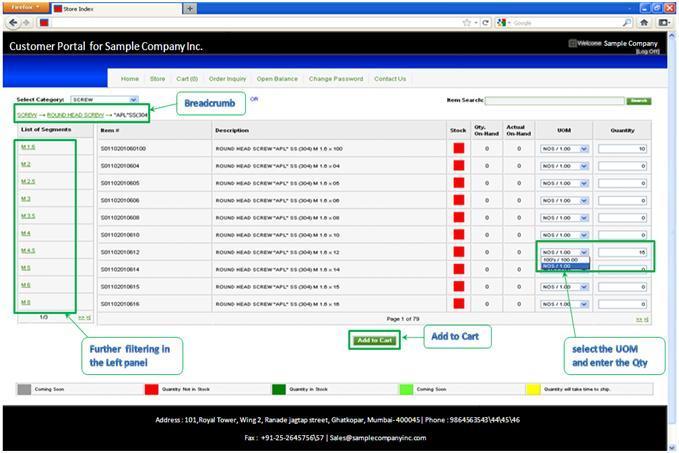
Greytrix Customer Portal for Sage 300 ERP


We are excited to announce release of our new solution Greytrix Customer Portal for Sage 300 ERP.

 Greytrix Customer Portal for Sage 300 ERP ( Sage Accpac ERP) opens a self-service access to your customers. Customer Portal of an organization gives their customers and business partners’ ability to access products information and place an order of required product from any internet enabled device. We have release Customer Portal designed especially for SME to boost their sales of product and increase services to customers.

   With the Customer Portal, you can empower your customers by providing them complete access to up to date and accurate information. It is a cost-effective solution that eliminates countless phone calls to verify the status of sales orders. By enabling your customers to make payments in the system, it will lessen time-consuming paperwork to reconcile accounting discrepancies resulting from incorrect billings and payment applications. The added convenience at your customers fingertips and the reliable automated payment entry processing result to an improved customer relationship, a sure win-win for both your business and your customers. Greytrix Customer Portal and Sage 300 ERP systems are linked to each other thereby enabling the transferral of a multitude of information from Customer Portal to Sage 300 ERP systems, and vice versa. The synchronization is automatically done, in real time. There is no need to manually import or export data ensuring accuracy of transferred data  


 KEY FEATURES 

v  Provides a shared view of data between company and customers for greater transparency.
v  Self-service access to your customers to manage their accounts.
v  Automated payment processing lessens clerical errors.
v  Reduces unnecessary administrative and overhead costs.
v  Helps you keep up with increasing sales volume while minimizing costs.
v  Online, real-time integration with Sage 300 ERP.

 View Current Orders and Order History

 The 'Order Inquiry' menu provides your customers with a snapshot of their Orders. On this menu, they can check their outstanding orders and amount, view full order history for previous orders, and preview their statements. For each order, the system provides details on the shipped quantity and Quantity on backorder.
 

  The Customer Portal also extends your billing and collection facilities by providing your customers with updated balances of their accounts online and in real time. This enables customers to review their accounts anytime and spot any possible discrepancies sooner. With this capability, your accounting department can avoid the time and expense of generating and mailing hard-copy statements to your customers.

   Hopefully this gives you an overview of Greytrix Customer Portal works with Sage 300 ERP (Sage Accpac ERP).

Monday, May 23, 2011

Greytrix Launches Greytrix TDS 2.1v for Sage ACCPAC ERP

Greytrix launches the new improved version of Greytrix TDS 2.1 for Sage ACCPAC ERP. Along with the basic functionalities, Greytrix has encorporated further enhancement are as follows:-

•Provided the User a screen called Manual TDS Entry where user can hit the TDS Register even if the Invoice is posted.Manual TDS entry allows changing TDS related fields before crating Remittance of the TDS applicable document. The changes one makes using Manual TDS entry hits TDS registers.

One can change the TDS related data for the following documents:
1.Invoice
2.Credit Note
3.Debit Note
4.Prepayment

•Modified the Form16 A Register to take the Vendor Range and even more parameters [Assessment Year/Issue Date/].

•Modified the Form 16A to include latest format and annexure displaying the entire list of transactions.

•Added a feature of overriding the TDS Base Amount in Prepayment/Misc Payment.

•The Partial PJC Integration; i.e. the adjustment part is not done but the job
related entries are passed in the TDS Register.

•Allowing deduction for Plain Credit notes/Debit Notes applied against Credit Notes/Invoices.

To grab your trial copy email us at sales@greytrix.com

Tuesday, March 16, 2010

SMEs & ERP : 3 Cs to be answered before selecting an ERP for SME


Read on to get a sneak preview of the major challenges faced in selecting the Right ERP
Choice

How to choose an ERP ? always proves to be one of the most important and difficult questions that have to be answered by the SMEs. How to decide whether to go ahead with a global player or with a customized local player? Will they be able to meet my requirements and what will be the implication? The key is to understand your business requirements and then evaluate ERPs and select the one which meets most of your critical requirements. The ERP has to be configurable and user friendly product, it should easily be able to adapt to multiple industry segment and lines of business. The ERP should be built around an architecture which can support growing enterprises mapping your current requirements and giving you scope to expand. There should always be a scope of growth in the ERP as business solutions cannot be changed every year, it is a long term commitment that is made between the ERP and the Organization using it. There should be add-on products for example a Business Intelligence Solution ,which can work on the base product and enhance the functionality of the product thus fulfilling your requirements which may arise in future.
Cost

Cost is a major fear factor for the SMEs, everybody is scared of the costs that are associated with an ERP solution and no one is clear what the right ERP solution is and what is the right Cost of an ERP for you. There is no clear measure of defining these costs and no standard parameters of what is the right ERP for SME. There is cut throat competition in the market and ERPs are available at very competitive prices. Every vendor claims to provide the most economical solution. How will you select the best player and what suits you. Cost is a major distinguishing factor but also we need to focus on the Vendor Portfolio , What kind of solutions is the vendor offering , What is the vendors client base and what is the authenticity of the vendor. The companies have to go through a tedious process to search for the right solution. The Vendor that you Zero down on must have a strong Industrial backing, it must have a good experience on delivering the kind of business solutions that you are looking at. The vendor must have industry wide knowledge so that it can make you aware of the best practices followed into the industry. One more major factor that you need to consider is that how efficiently the Vendor can bridge the Cost Vs functionality Gap, offering you the most optimal solution at the most optimal cost You always need to check for the hidden costs associated with the Vendor and the product.
Customization

Every company wants the ERP to work according to the company’s current business process, they do not want to change according to the ERP. Companies prefer customizing the ERP application according to their business needs. This usually proves fatal in the long run. The costs involved with customization are huge and there is no guarantee that the customizations will work as desired also if the company changes it business process the entire application will have to be customized again. This is an additional risk and the companies usually want to avoid it ..the SMEs today feel that there is no good solution existing in the market , either they are very expensive or very low in functionality. The ERP should be configurable so that it can be easily tuned to your company’s business process as on date and tomorrow if you change your business process all you have to do is to change the same in the ERP. There should be always nil amount of customizations done. Your motto has to be to come as close as possible to your current business process and avoid unnecessary customizations.

Sage ACCPAC ERP from Sage Software is a world class product which solves these problems for you. Sage has been a world leader in the SME segment for the past 30 years delivering the most optimal solutions at most optimal prices (Prices start @ 2.99 lakhs). Sage focuses on providing the right solution for SMEs, with the help of very strong and dedicated channel partners. Sage operates on a partner model and we, Greytrix are the Premium partners with Sage India for their ERP / CRM solutions. Contact us today to help you evaluate the right solution for you business. Email: sales@greytrix.com Phone: 022 67687847. For more information please visit us at http://www.greytrix.in/