Sage Accpac provide features that allow to change the properties of objects for better look and feel and improve the efficiency
The use of the Properties Dialog Box is to change the Title, Icon for the selected object.
• To change the title for the object, type a new name in the Title field.
• To change the icon, click the Change Icon button. Then, in the Change Icon dialog box, select an icon and click OK, or click Browse to select another icon file, then select an icon and click OK.
• To provide access rights for particular object, Accpac provides All Users checkbox. If any new report is deployed, and it should be accessed by all the users, click on All Users.
• The Start Finder First Feature provides the finder when the screen is open. When we click on Order Entry screen it would first pop up and open the data in the finder.

To get around this and open new screen for order at multiple instances, we need to go OE Module -> Order Entry Screen
Right click on Order Entry-> Properties. It would pop up a new window with a checkbox next to Start Multiple Copies which needs to be checked and clicked on OK.

While doing Order Entry, when we go to the order entry screen in OE Module, a single order entry window pops up where we can key in details. If the Order Entry screen is minimized and then the process is repeated in attempt to open the second Order Entry screen, Accpac opens the same screen instead of a new one.
Each time you click on Order Entry by selecting the Start Multiple Copies checkbox, a new window with unique multiple instances of Order Entry is created as follows:

At a Glance:
• Go to Order Entry -> OE Transactions
• Right Click on Order Entry Icon
• Select Properties
• Check the box label Start Multiple Copies. Click OK.
• Left click on Order Entry Icon as many times as unique instances of Order Entry is required.
In addition to this, Accpac also has user friendly quick access menus:
• Shortcut key to open a new company


 · Sage Accpac Home Page

 · To view the icons in List/ Detail format.


Sometimes we may come across situations when we require to refer to the old order as a reference while creating a new order, or it may happen that we are in a process of making an order, filling in Item details and we require to create another order on priority basis, which requires us to exit the unfinished order. Sage Accpac provides a Multiple Copy feature with which we can say Goodbye to all the above problems.

While doing Order Entry, when we go to the order entry screen in OE Module, a single order entry window pops up where we can key in details. If the Order Entry screen is minimized and then the process is repeated in attempt to open the second Order Entry screen, Accpac opens the same screen instead of a new one.

At a Glance:
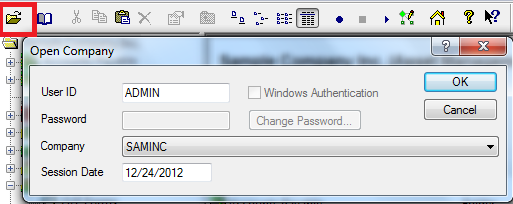
· Copy, Paste button to copy an existing screen and create a new.

· Edit, Stop, Run Button to run macros


· To view the Icons in Small, Large sizes.


 Posts
Posts

